


Choosing the best field service management software for HVAC businesses is really a question of fit. An HVAC company running two vans has different needs from one running twenty, and the best platform changes depending on team size, budget, and which parts of the job (scheduling, invoicing, accounting, compliance) are causing the most pain right now.
Disclaimer: This guide is written by the Service Fusion team, and Service Fusion is one of the platforms compared. To keep the comparison fair, we used each vendor’s own published information for features and pricing, dated every price, and noted where another platform is the stronger choice.
We compare six field service management (FSM) platforms built for HVAC contractors: Service Fusion, Jobber, Housecall Pro, FieldEdge, ServiceTitan, and FieldPulse.
Each brand is broken down the same way, covering core features, who it’s built for, typical cost, and the trade-offs worth knowing before you buy.
Table of Contents
- Methodology: How We Chose These HVAC Software Platforms
- Quick Overview by Company Type
- Best Field Service Software for HVAC Companies Compared at a Glance
- Service Fusion
- Jobber
- Housecall Pro
- FieldEdge
- ServiceTitan
- FieldPulse
- The Bottom Line for HVAC Contractors.
- HVAC Field Service Software FAQs
Methodology: How We Chose These HVAC Software Platforms
We looked for the best field service management software for HVAC contractors to shortlist, and compared them on the same criteria:
- HVAC fit: Built for trade and home service work, with HVAC as a core industry.
- Core workflow: Scheduling, dispatch, estimates, invoicing, payments, and a mobile app for technicians.
- Pricing model and transparency: Whether prices are published, and whether costs rise per user, per technician, or by plan.
- Team-size fit: Who each platform suits, from solo operators to large contractors.
- Accounting: QuickBooks integration or built-in accounting.
Features and prices come from each vendor’s own website, checked in November 2026. Vendors often change plans, so confirm current pricing before you buy.
Quick Overview by Company Type
There isn’t a single best HVAC software for every small business, because “small” covers everything from a solo technician to a 20-truck operation. Here’s the fastest way to narrow it down by the shape of your team:
- Service Fusion: Best for HVAC teams that want predictable costs as they add technicians and office staff.
- Jobber: Best for solo operators and small crews who want an affordable, easy-to-learn starting point.
- Housecall Pro: Best for residential HVAC teams that want strong customer-facing tools, such as online booking and review requests.
- FieldEdge: Best for shops that sell a lot of service agreements and want a deep flat-rate pricebook.
- ServiceTitan: Best for larger HVAC contractors that need enterprise reporting, marketing attribution, and call center tools.
- FieldPulse: Best for HVAC teams that want customizable workflows and a broad feature set, priced by seat.
Best Field Service Software for HVAC Companies Compared
| Software | Best For | Starting Price (as of November 2026) | Team Size |
|---|---|---|---|
| Service Fusion | Unlimited users at a flat monthly rate | Starts at $208/month billed annually ($245/month month-to-month) | 3–30 technicians |
| Jobber | Solo operators and very small crews | Starts at $29/month billed annually (Core, 1 user; $49/month with no commitment) | Plans priced by number of users; extra users $29/month each |
| Housecall Pro | Residential teams that want customer-facing tools | Starts at $59/month billed annually (Basic, 1 user; $79/month month-to-month) | Basic 1 user; Essentials up to 5; MAX up to 8, then $35/month per extra user |
| FieldEdge | Flat-rate pricebook and service agreement management | Pricing on request | Quoted by team size and add-ons |
| ServiceTitan | Larger contractors with call centers and sales teams | Pricing on request | Quoted per technician |
| FieldPulse | Customizable workflows and a broad feature set | Pricing on request | Quoted per seat |
Prices above were checked on each vendor’s pricing page in November 2026. Confirm current rates with each provider before budgeting.
Service Fusion 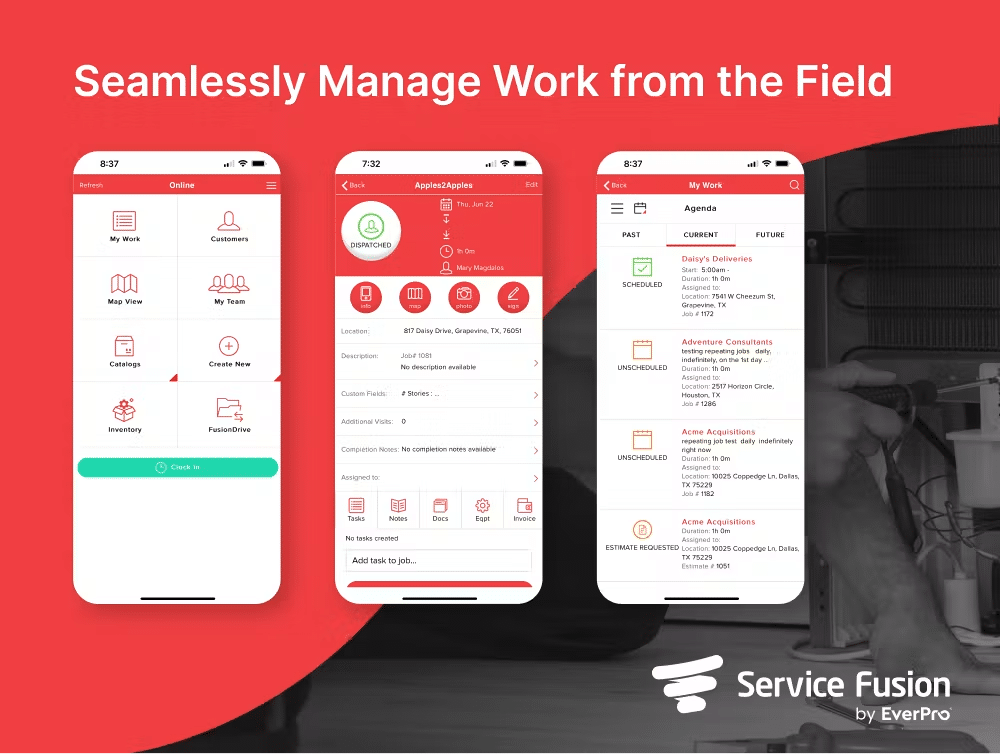 Service Fusion is a cloud-based FSM platform built for HVAC, plumbing, electrical, and other trade businesses, with the flat monthly rate as its main point of difference. Every plan includes unlimited users, so a five-technician crew and a twenty-technician crew on the same tier pay the same amount. Learn more about Service Fusion’s HVAC software. Book a Demo | Best For • HVAC companies that want the software bill to stay the same as the team grows. Pros • Cost stays predictable regardless of how many people need a login. • Inventory, job costing, and eSign tools are built into higher tiers rather than sold as separate software. • No per-user fees to plan around as the team grows. Cons • The interface is more functional than the modern-looking ones from some newer competitors. • No free trial, so evaluating the platform means booking a demo first. • Solo operators and very small teams often pay more upfront than they would with a per-user tool. • Add-ons like GPS fleet tracking sit outside the flat rate and add to the monthly total. |
| Key Features: • Drag-and-drop dispatch board with GPS fleet tracking available as an add-onJob costing, inventory management, and job photo uploads from the Plus plan up • Integrated voice and text from the Plus plan up; customer web portal, custom documents, eSign documents, and progress billing on the Pro plan • QuickBooks integration and a mobile app with offline mode for technicians in low-signal areas • Structured onboarding and unlimited support by phone, email, or live chat, with no long-term contract Cost (as of November 2026): Service Fusion’s Pricing is divided into three plans, all with unlimited users: • Starter: $245/month, or $208/month billed annually. Covers core scheduling and dispatching, QuickBooks integration, invoicing and reporting, and text messaging alerts. • Plus: $382/month, or $325/month billed annually. Adds inventory management, job costing, job photo uploads, and integrated voice and text. • Pro: $627/month, or $533/month billed annually. Adds Open API integration, custom documents, eSign documents, a customer web portal, and progress billing and recurring invoicing. Add-ons such as GPS fleet tracking and automated call tracking are priced separately and will increase the monthly total. Full details and current pricing are on Service Fusion’s pricing page. | |
Jobber Jobber is a field service platform built primarily for small home service businesses across HVAC, plumbing, electrical, and similar trades. It’s generally the fastest of this group to set up, which matters if you’re switching from manual scheduling. | Best For • Solo HVAC technicians and small teams moving off spreadsheets or paper. Pros • Low-cost, straightforward entry point for very small teams. • Easy to learn, with a shorter onboarding curve than some competitors. • Client hub gives customers a self-service option that can cut down on phone calls. Cons • Plans are priced by number of users, so costs climb noticeably as a team grows past the entry tiers. • Some tools, such as Marketing Suite, Receptionist, and Pipeline, are add-ons on lower-tier plans, and payment processing fees can push the actual monthly cost above the headline price. |
| Key Features: • An online client hub where customers can approve quotes, view job history, and pay • Drag-and-drop calendar scheduling with route optimization • Quoting, invoicing, and batch invoicing for multiple completed jobs at once • Custom checklists and service agreement attachments on client files • QuickBooks integration and automated appointment reminders Cost (as of November 2026) Jobber’s plans start at $29 a month for one user on the Core plan, billed annually, or $49 a month with no commitment. Connect, Grow, and Plus cost more, with prices rising by team size, and additional users cost $29 a month each. Jobber offers a 14-day free trial. | |
Housecall Pro Housecall Pro serves home service businesses across HVAC, plumbing, and electrical, with a strong focus on customer communication, online booking, and reviews. | Best For • Residential HVAC teams that want strong customer-facing tools alongside scheduling and invoicing. Pros • Published pricing on every plan, with a free trial • Customer-facing tools such as online booking, review requests, and automated marketing • Strong mobile app experience for field technicians. Cons • Add-ons can meaningfully increase the total monthly cost beyond the base plan. • Plans cap the number of included users, and extra users on MAX cost more each month. |
| Key Features: • Drag-and-drop scheduling, real-time dispatching, and online booking • Estimates, invoicing, and review requests • QuickBooks integration, a visual price book, and flat-rate pricing from the Essentials plan • Employee time tracking and detailed job and estimate reporting. Cost (as of November 2026) • Basic: $79 per month for one user, or $59 per month billed annually. • Essentials: $189 a month for up to five users, or $149 billed annually. • MAX: $329 a month for up to eight users, or $299 billed annually, with extra users and some add-ons priced separately. | |
FieldEdge FieldEdge is built specifically for HVAC, plumbing, and electrical contractors that have outgrown basic scheduling tools. Its flat-rate pricebook draws on FieldEdge’s own equipment database, making it one of the more detailed pricebooks in this comparison. | Best For • Established HVAC shops that sell service agreements and want a deep flat-rate pricebook. Pros • Flat-rate pricebook depth that supports “good, better, best” upselling • Solid QuickBooks sync for teams that rely heavily on it for accounting. • Built specifically around HVAC and plumbing workflows rather than a general trades tool. Cons • No published pricing or free trial, so budgeting requires a sales conversation first • Pricing depends on team size and add-ons, so costs are hard to compare until you have a quote. |
| Key features: • Flat-rate pricebook with pre-built HVAC and plumbing line items • Service agreements, with advanced agreement tools from the Premier plan • Dispatching, scheduling, and call booking, with advanced dispatching from the Premier plan • Mobile invoicing and in-field payment collection • QuickBooks Online and Desktop integration. Cost (as of November 2026) FieldEdge doesn’t publish prices. Its Select, Premier, and Elite plans are quoted based on the number of technicians you have and the add-ons you need, so a demo and a custom quote are required. | |
ServiceTitan ServiceTitan is built for larger residential and commercial contractors with more complex operations, including call centers, sales teams, marketing attribution, and detailed reporting. For an HVAC company with the staff and budget to use that depth, it can be the right fit. RELATED READING: Service Fusion vs ServiceTitan | Best For • Larger HVAC contractors that need enterprise reporting, marketing attribution, and call center tools. Pros • Deep reporting, sales, and marketing tools for contractors running at scale. • Payroll, commission tracking, and membership tools on higher packages. • Built for trades businesses with large teams and multiple departments. Cons • No published pricing or free trial, so budgeting starts with a sales conversation. • Priced per technician, so costs rise as the field team grows. • More platform than many small HVAC teams need. |
| Key Features: • Dispatching, scheduling, call booking, and invoicing • Pricebook, mobile estimates, and payroll management • Advanced reporting, configurable payroll, and commission tracking on The Works package • Customizable memberships for recurring customers. Cost (as of November 2026) ServiceTitan doesn’t publish prices. Its Starter, Essentials, and The Works packages are quoted per technician. | |
FieldPulse FieldPulse is a field service platform for HVAC, electrical, plumbing, and other trades, covering both residential and commercial work. It combines core scheduling and invoicing with customizable workflows and a range of optional premium products. | Best For • HVAC teams that want customizable workflows and a broad feature set in one platform. Pros • Broad core platform, including job costing, inventory, asset management, and a customer portal. • Custom workflows and digital forms to standardize how jobs get done. • An AI office assistant included on all plans. Cons • No published pricing, so budgeting starts with a sales conversation. • Seat-based pricing, with full-access and field seats priced differently. • Several capabilities, including phone system, AI call handling, fleet tracking, and the pricebook, are optional paid products. |
| Key Features: • Scheduling and dispatching, work orders, and job and project management • Estimates, invoices, payments, and QuickBooks integrationJob costing, inventory management, dashboards, and reporting • Customer portal, booking portal, and maintenance agreement tools. Cost (as of November 2026) FieldPulse doesn’t publish prices. Plans are seat-based and quoted, and premium products are priced separately. | |
The Bottom Line for HVAC Contractors
The right choice comes down to team size and which problem you’re solving first.
If unpredictable software costs as you hire are the main frustration, Service Fusion’s flat-rate, unlimited-user model is built for exactly that.
If you’re comparing that flat-rate approach against per-user or per-technician tools like Jobber, Housecall Pro, FieldEdge, ServiceTitan, or FieldPulse for your specific technician count, Service Fusion’s HVAC software page breaks down what’s included at each tier, and the pricing page has the full plan-by-plan breakdown. If you’re weighing Service Fusion against ServiceTitan specifically, see our Service Fusion vs ServiceTitan comparison.
The clearest way to see whether the numbers work for your team is to look at your own setup directly.
Book a free Service Fusion demo to see the dispatch board, pricing, and QuickBooks integration in action, or get in touch with the team with questions about your specific technician count and current software costs.
HVAC Field Service Software FAQs
What is the best field service software for a small HVAC company?
It depends on team size and how you want to pay. Solo operators and very small crews often start with Jobber or Housecall Pro, which publish low entry prices. Teams of roughly 3 to 30 technicians who expect to add staff may prefer Service Fusion’s flat-rate plan with unlimited users. Larger contractors with call centers and sales teams tend to evaluate ServiceTitan.
How much does HVAC field service software cost?
As of November 2026, published starting prices for annual billing range from $29 per month for one user on Jobber’s Core plan to $208 per month for unlimited users on Service Fusion’s Starter plan. Month-to-month rates are higher. FieldEdge, ServiceTitan, and FieldPulse quote prices individually.
Pricing Sources
Related Posts
Must-Have Tools for HVAC Technicians
Continue ReadingHow Kuhlman Electric Found Their Field Service ‘Game Changer’ and Doubled Revenue
Continue ReadingStay Informed
Get the latest news and insights plus, Service Fusion offers and updates.Thank you for your submission.
SHARE