


This guide compares six field service management (FSM) platforms built for plumbing contractors: Service Fusion, Jobber, Housecall Pro, FieldEdge, ServiceTitan, and Workiz. Each is broken down the same way, covering who it’s built for, core features, typical cost, and the trade-offs worth knowing before you buy.
Table of Contents
- Quick Overview by Company Type
- Best Field Service Software for Plumbing Businesses Compared at a Glance
- Service Fusion
- Jobber
- Housecall Pro
- FieldEdge
- ServiceTitan
- Workiz
- Frequently Asked Questions
- The Bottom Line for Plumbing Contractors.
Quick Overview by Company Type
There isn’t one best plumbing software for every small business, because “small” covers everything from a one-truck operator to a twenty-technician shop running its own call center. Here’s the fastest way to narrow it down by the shape of your team:
- Service Fusion — best for plumbing businesses that want the software bill to stay flat as they add technicians and office staff.
- Jobber — best for solo plumbers and small crews who want an affordable, easy-to-learn starting point.
- Housecall Pro — best for residential plumbers who want fast onboarding and built-in customer communication tools.
- FieldEdge – best for multi-truck plumbing shops that want a deep flat-rate pricebook and tight QuickBooks Desktop sync.
- ServiceTitan — best for larger, established plumbing operations running call centers or multiple crews.
- Workiz — best for call-heavy plumbing businesses that field a high volume of same-day and emergency requests.
Best Field Service Software for Plumbing Businesses Compared
| Software | Best for | Starting price | Team size |
| Service Fusion | Unlimited users at a flat monthly rate | From $208/month (annual) | 5-30 technicians |
| Jobber | Solo plumbers and very small crews | Around $49/month (1 user) | 1-10 technicians |
| Housecall Pro | Fast onboarding and customer communication | Around $59-79/month | 1-50 technicians |
| FieldEdge | Flat-rate pricebook and QuickBooks sync | Pricing on request | 5-50 technicians |
| ServiceTitan | Call centers and multi-crew operations | Pricing on request | 15+ technicians |
| Workiz | Call-heavy dispatch and emergency work | Free (Lite) to roughly $230+/month | 1-30 technicians. |
Vendors update their pricing regularly, and several don’t publish it at all. Treat the figures above as a starting point and confirm current rates directly with each provider before budgeting.
Service Fusion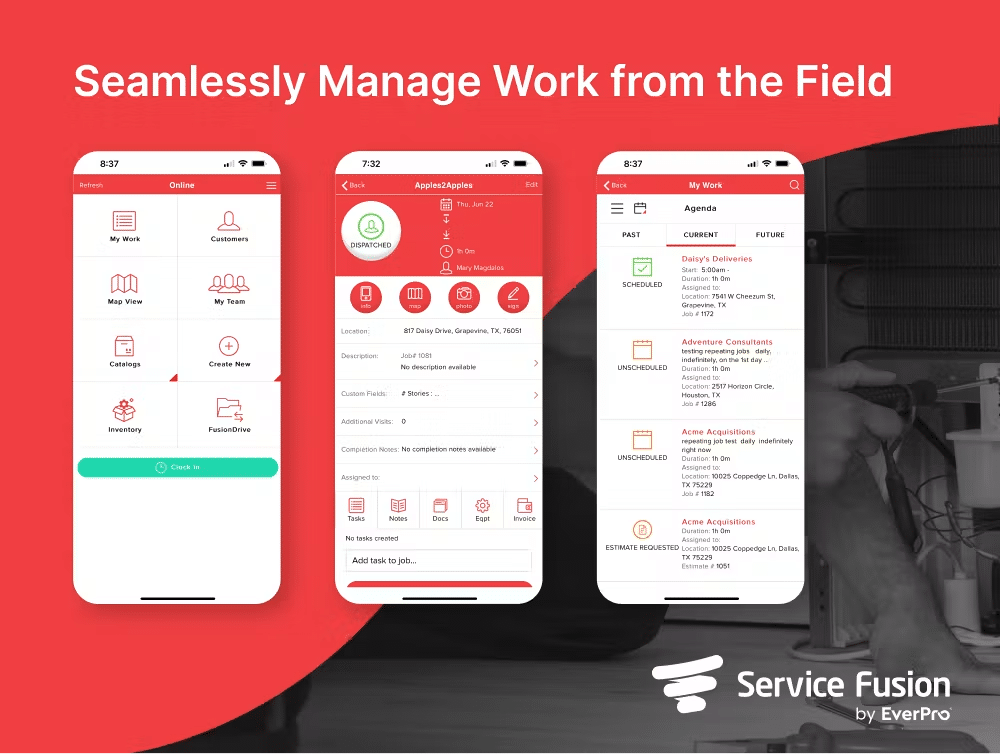 Service Fusion is a cloud-based FSM platform built for HVAC, plumbing, electrical, and other trade businesses, with the flat monthly rate as its main point of difference. Every plan includes unlimited users, so a five-technician crew and a twenty-technician crew on the same tier pay the same amount. Book a Demo | Best For Multi-technician plumbing businesses that want scheduling, dispatch, and invoicing in one platform without paying per seat. Key Features: – Drag-and-drop dispatch board built to slot in same-day emergency calls alongside scheduled jobs, with GPS fleet tracking available as an add-on. – Job costing, inventory management, and job photo uploads from the Plus plan up. – Customer web portal, integrated VoIP calling, and eSign documents on the Pro plan – QuickBooks integration and a mobile app with an offline mode for technicians working in basements, crawl spaces, or areas with poor signal – Guided onboarding and unlimited phone, email, and live chat support, with no long-term contract. |
| Pros – Cost stays predictable regardless of how many office staff or technicians need a login. – Inventory, job costing, and eSign tools are built into higher tiers rather than sold as separate software. – No per-user fees to plan around as the team grows. Cons – The interface is more functional than the modern-looking ones from some newer competitors. – No free trial, so evaluating the platform means booking a demo first. Cost Service Fusion has three plans, all with unlimited users: – Starter – $245/month, or $208/month billed annually. Covers core scheduling and dispatching, QuickBooks integration, invoicing and reporting, and text messaging alerts. – Plus – $382/month, or around $325/month billed annually. Adds inventory management, job costing, and job photo uploads. – Pro – $627/month, or about $533/month billed annually. Adds a customer web portal and mobile app, plus integrated voice calling and eSign documents. Add-ons such as GPS fleet tracking and automated call tracking are priced separately and will increase the monthly total. Full details and current pricing are on Service Fusion’s pricing page. | |
Jobber Jobber is a field service platform built for small home service businesses in the plumbing, HVAC, electrical, and related trades. It’s generally the fastest of this group to set up, which matters if you’re switching from manual scheduling mid-season. | Best For Solo plumbers and small teams moving off spreadsheets or paper. Key Features: – An online client hub where customers can approve quotes, view job history, and pay – Drag-and-drop calendar scheduling with route optimization – Quoting, invoicing, and batch invoicing for multiple completed jobs at once – Custom job forms and checklists for logging fixture details, permits, or before-and-after photos – QuickBooks Online sync and automated appointment reminders. |
| Pros – Low-cost, straightforward entry point for very small teams. – Client hub gives customers a self-service option to approve quotes and pay online, which reduces callback phone tags. – Route optimization helps a crew handling several stops in a day fit in more jobs. Cons – User count tiers pricing, so costs step up noticeably once a plan’s included users are exceeded. – Built for scheduled residential work first, so dedicated after-hours or emergency-dispatch routing is lighter than what a plumbing-focused platform offers. – Add-ons like the marketing suite and AI receptionist, plus payment processing fees, can push the real monthly cost above the plan price. Cost Jobber’s Core plan starts at $49/month for one user (as low as the high $20s to $30s a month with an annual commitment). The Connect and Grow tiers scale by team size, running from roughly $139/month for up to 5 users to around $399/month for up to 15 users at published rates, with an additional per-user charge once a plan’s included seats are exceeded. | |
Housecall Pro Housecall Pro serves home service businesses across plumbing, HVAC, and electrical, with tools built to get a small crew running fast and keeping customers in the loop between booking and payment. | Best For Residential plumbers who want trade-specific onboarding and strong customer communication tools out of the box. Key features: – Online booking, quoting, and batch invoicing for multiple completed jobs – Automated customer notifications and review requests – Built-in price book for consistent, itemized quoting across technicians – QuickBooks integration and employee GPS tracking on Essentials and up – Wisetack customer financing for larger jobs like repipes or water heater replacements. |
| Pros – Fast setup, with most businesses reportedly running within hours rather than weeks. – Automated review requests and follow-up texts help build the online reputation that drives repeat and referral plumbing work. – Strong mobile app experience for field technicians. Cons – QuickBooks integration and employee GPS tracking require the Essentials plan or higher. – Per-user pricing on higher tiers adds up for teams with more than five or six technicians. – Some construction-adjacent features aren’t part of the platform, since it’s built for service calls rather than longer commercial plumbing projects. Cost The Basic plan runs roughly $49-$79/month for one user. Essentials moves to around $129-$189/month for up to five users, and MAX is custom-quoted, adding unlimited users, advanced reporting, and a dedicated account manager. Several add-ons, including campaigns, payroll, and AI call handling, are priced separately. | |
FieldEdge FieldEdge is built specifically for plumbing, HVAC, and electrical contractors that have outgrown basic scheduling tools. Its flat-rate pricebook, built on the Coolfront database, is one of the more detailed options in this comparison. | Best For Multi-truck plumbing shops that want a deep flat-rate pricebook and don’t want to leave QuickBooks Desktop behind. Key Features: – Flat-rate pricebook with thousands of pre-built plumbing and HVAC line items – Service agreement management, including renewal tracking for maintenance plans – Visual dispatch board with drag-and-drop scheduling – Mobile invoicing and in-field payment collection – QuickBooks Online and Desktop integration. |
| Pros – Flat-rate pricebook depth that supports “good, better, best” upselling on repairs. – Strong QuickBooks sync, including Desktop, for shops that rely on it for accounting. – Built specifically around plumbing, HVAC, and electrical workflows rather than a general trades tool. Cons – No published pricing or free trial, so budgeting starts with a sales conversation. – The mobile app is functional but generally considered less polished than Jobber’s or Housecall Pro’s. – Third-party estimates put per-technician costs on the high side for shops with under five technicians. Cost FieldEdge doesn’t publish pricing. Third-party estimates put small teams at roughly $150-$300/month in the entry tier, with per-user costs commonly cited around $100 per office user and $125 per technician, adding up as the team grows. A demo and custom quote are required for exact figures. | |
ServiceTitan ServiceTitan is an enterprise-grade platform built for HVAC, plumbing, and electrical businesses. It consistently shows up in searches for plumbing software because it’s the market leader for larger shops, even though its cost and complexity make it out of reach for most small operations. | Best For Larger, established plumbing operations running call centers, multiple crews, or several locations. Key Features: – Call booking and dispatch tools built around high call volumes and multiple crews – Pricebook management and membership or maintenance plan tools – Marketing attribution reporting that ties booked jobs back to campaigns – Payroll and inventory management on higher tiers – Mobile app for technicians alongside deep back-office reporting. |
| Pros – Deep reporting, pricebook management, and marketing attribution tools that scale with complex operations. – Built specifically for trades businesses rather than adapted from a general field service tool. – Recently added an AI assistant, Atlas, to help automate parts of the office workflow. Cons – Pricing isn’t published, and third-party estimates put monthly costs well above what most small plumbing businesses can afford. – Implementation is typically a multi-month project with a dedicated onboarding specialist. – Generally considered overkill and over-budget for shops running fewer than roughly 10 to 15 technicians. Cost ServiceTitan is quote-only. Third-party estimates put per-technician costs in the low-to-mid-hundreds of dollars per month, which means a 10-technician plumbing shop can expect a total well into four figures per month before implementation costs. | |
Workiz Workiz is built around the phone call as the main booking channel, which fits plumbing better than most trades, given that emergency work still often starts with an inbound call rather than an online form. | Best For Call-heavy plumbing businesses that field a high volume of same-day and emergency requests. Key Features: – Built-in VoIP phone system linked to customer and job records – Free pricebook on the Lite plan, expanding to full flat-rate pricing on paid tiers – Drag-and-drop scheduling and dispatch board – Paperless invoicing and online payments – Genius AI tools for call handling and workflow automation on paid plans. |
| Pros – The Free Lite plan for up to two users gives a solo plumber or a two-tech operation a no-cost way to move off spreadsheets. – Built-in phone systems tie inbound calls directly to job and customer records. – Genius AI tools aim to automate parts of call handling and follow-up on paid tiers. Cons – Pricing is not published beyond the free tier, so exact costs for paid plans usually require a quote. – Flat-rate pricing tools and sales proposals are reserved for the top Ultimate tier. – Per-user costs beyond the included seats add up for larger teams. Cost Lite is free for up to two users. Paid plans (Standard and Pro) are generally quoted, with published add-on rates of roughly $55-$65 per extra user beyond the first five, putting a fully staffed small team in a monthly range similar to Housecall Pro or FieldEdge. | |
Frequently Asked Questions
How much does plumbing field service software cost?
It depends on how you’re billed. Per-user platforms like Jobber and Housecall Pro start around $40-$80/month for a single user, and the cost increases with each additional technician. Flat-rate, unlimited-user platforms like Service Fusion start at a higher price, around $208-$245/month, but that price doesn’t increase as the team grows. Enterprise platforms like ServiceTitan are quote-only and typically run to a few hundred dollars per technician, per month, including implementation.
Is Jobber good for plumbers?
For a solo plumber or a small residential crew, yes. Quoting, scheduling, and the client hub are quick to learn, and the entry-level pricing is hard to beat. Where it gets stretched is in emergency-heavy dispatch and larger teams: pricing steps up with user count, and the after-hours routing tools are lighter than those offered by a plumbing-focused platform like Service Fusion or Workiz.
What’s the difference between plumbing software and general field service management software?
Not much, in most cases. “Plumbing software” usually refers to field service management (FSM) software with plumbing-specific extras layered on top, such as flat-rate repair pricebooks, fixture-level job details, and dispatch tools built around same-day emergency calls. Every platform in this guide is a general FSM platform that also serves HVAC and electrical contractors, so the real question isn’t “plumbing software or FSM software,” it’s how well a given platform’s plumbing features and pricing fit your team.
Software handles the scheduling and dispatching side of the job, but the numbers that go into each quote still matter. If you want a refresher on pricing jobs, how to write a plumbing quote, and how to build a plumbing estimate template, cover the basics, and if the accounting side needs attention too, accounting for plumbing businesses walks through tracking job costs and cash flow.
Software handles the scheduling and dispatching side of the job, but the numbers that go into each quote still matter. If you want a refresher on pricing jobs, how to write a plumbing quote, and how to build a plumbing estimate template, cover the basics, and if the accounting side needs attention too, accounting for plumbing businesses walks through tracking job costs and cash flow.
The Bottom Line for Plumbing Contractors
The right choice comes down to how the phone rings and how the team is shaped.
If unpredictable software costs as you add technicians and dispatchers are the main frustration, Service Fusion’s flat-rate, unlimited-user model is built for exactly that.
If you’re weighing that flat-rate approach against per-user or per-technician tools like Jobber, Housecall Pro, FieldEdge, ServiceTitan, or Workiz for your specific crew size, Service Fusion’s plumbing software page breaks down what’s included at each tier, and the pricing page has the full plan-by-plan breakdown.
The clearest way to see whether the numbers work for your business is to look at your own setup directly.
Book a free Service Fusion demo to see the dispatch board, pricing, and QuickBooks integration in action, or get in touch with the team with questions about your specific technician count and current software costs.
Related Posts
Best Field Service Software for Businesses With 5 to 20 Technicians (2026)
Continue ReadingField Service Software Data Migration Checklist
Continue ReadingStay Informed
Get the latest news and insights plus, Service Fusion offers and updates.Thank you for your submission.
SHARE