


Scheduling is the invisible workhorse of a field service business. When it works, jobs flow from the first call to the final invoice without anyone thinking about it. When it doesn’t, the whole day unravels: technicians criss-cross town burning fuel, customers wait through four-hour windows, and your best tech ends up at a job that needed someone else’s license.
If you run an HVAC, plumbing, or electrical business with three or more technicians, technician scheduling is one of the highest-leverage skills your office can build. This guide covers the best practices dispatchers and office managers use to schedule service technicians efficiently, reduce drive time, avoid double-booking, and keep customers and crews happy.
Key Takeaways
- Match jobs to technician skills and certifications first, availability second; skills mismatches are a common cause of repeat visits
- Use a central dispatch board as the single source of truth, so the whole office sees the same schedule in real time
- Cluster jobs geographically and plan routes to cut windshield time, which is unbilled time
- Build buffer time into every schedule; back-to-back bookings with zero slack collapse the moment one job overruns
- Prioritize first-time fix rate over jobs-per-day; the industry average is roughly 75–80%, and every failed first visit often means another truck roll
- Confirm appointments and send on-the-way notifications automatically to reduce no-access visits
- Review scheduling data weekly to spot patterns: chronic overruns, underused techs, and recurring callback types
Quick Answer: What Are the Best Practices for Scheduling Service Technicians?
The best practices for scheduling service technicians are: assign jobs based on skills and certifications rather than just availability; run all scheduling through a single real-time dispatch board; group jobs by geographic area to minimize drive time; build buffer time between appointments; prioritize urgent and high-value work with clear rules; confirm appointments with customers in advance; and track metrics like first-time fix rate and technician utilization to improve week over week. Field service scheduling software automates most of these steps, replacing whiteboards and spreadsheets with a live schedule the whole team can see.
1. Schedule by Skill First, Availability Second
The fastest way to generate a callback is to send the wrong technician. An available tech is not the same as the right tech, and the difference is in your first-time fix rate: research attributes roughly one in four repeat visits to skills mismatches, with technicians lacking the required skills or training accounting for 25% of failed first visits.
Practical ways to schedule by skill:
- Keep a current skills and certification matrix for every technician: licenses, equipment specialties, brands they know, jobs they’ve historically closed first time
- Tag job types in your scheduling system so a commercial refrigeration call can only be assigned to techs qualified for it
- Record which techs have been to a customer’s site before; familiarity with the property and history speeds up diagnosis.
This is where dedicated service technician scheduling software earns its keep over a shared calendar. A calendar knows who’s free. A proper scheduling system knows who’s free and qualified.
2. Run Everything Through One Dispatch Board
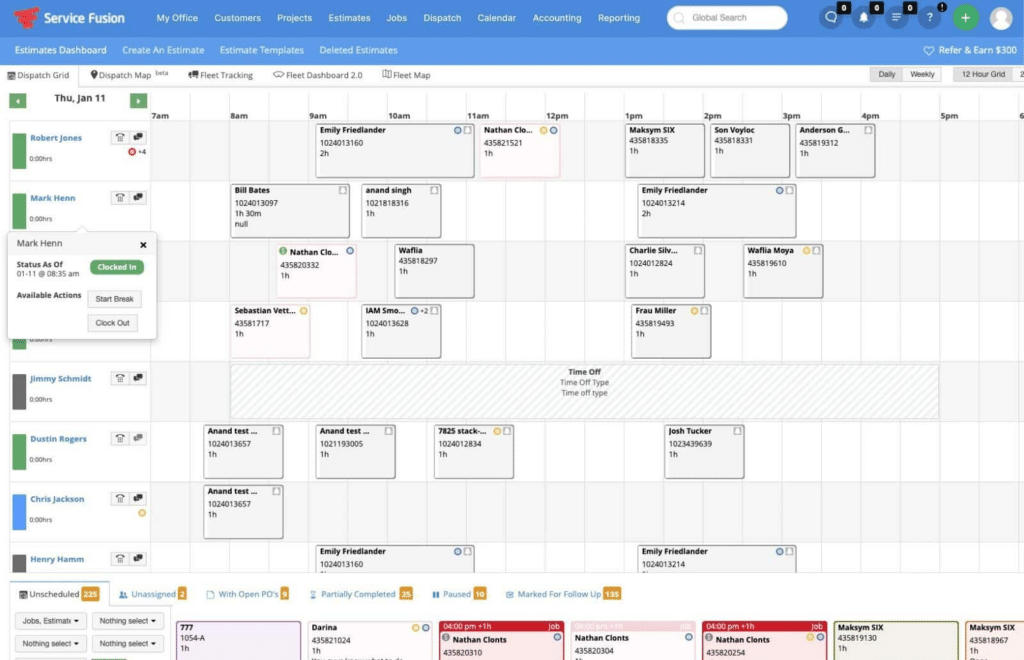
Scheduling breaks down when the schedule lives in three places: a whiteboard, a spreadsheet, and someone’s memory. The fix is a single, real-time dispatch board that acts as the source of truth for the entire office.
A good dispatch board shows, at a glance:
- Every technician’s day as a timeline, with jobs as movable blocks
- Job status in real time: assigned, en route, on site, complete
- Unassigned jobs waiting for a slot
- Gaps that can absorb an emergency call.
The drag-and-drop dispatch board in field service scheduling software means a dispatcher can rework the afternoon in seconds when a job overruns or a truck breaks down, and every change syncs instantly to technicians’ phones. Compare that with the phone-tag version: dispatcher calls tech, tech doesn’t pick up because they’re under a sink, customer calls asking where their technician is. The dispatch board removes that entire class of problem.
3. Cluster Jobs Geographically and Plan Routes
Windshield time is dead time. Every unnecessary mile is fuel, vehicle wear, and, most expensive of all, technician hours that nobody is paying for. Route-aware scheduling doesn’t require complex algorithms to start. Use these basic zoning disciplines:
- Divide your service area into zones: Try to keep each technician restricted to one or two specific zones per day to minimize cross-town travel.
- Offer arrival window trade-offs: Book non-urgent jobs into the zone a tech is already scheduled to visit. Most customers will happily wait an extra day if it means getting a tighter, more predictable arrival window.
- Sequence by geography, not booking order: Arrange the daily queue based on map efficiency rather than the chronological order in which the calls came in.
- Use mapping and GPS tools: Use your scheduling software to visually spot and eliminate routes that zigzag or backtrack.
Field service route optimization compounds: shaving 20 minutes of drive time per tech per day, across five techs, recovers over eight hours a week, which is essentially a free extra tech-day. Even before advanced route optimization, basic zoning discipline can make the schedule feel less chaotic.
4. Build Buffer Time Into Every Day
A schedule with zero slack isn’t efficient; it’s fragile. Jobs overrun, parts runs happen, and traffic exists. When every appointment is booked back-to-back, one 30-minute overrun cascades through the whole day and the last customer gets a 6pm arrival for a 2pm window.
Best practice is to deliberately under-book:
- Add a buffer between jobs, sized to your real average overrun (your job duration data will tell you; see practice 8)
- Hold one flexible slot per tech per day for emergencies; if no emergency lands, it absorbs overruns or becomes a maintenance call
- Set realistic job durations by job type rather than a default one-hour block. Insufficient time allocation accounts for around 13% of failed first visits.
Buffers feel like lost capacity on paper. In practice, they’re what keep the scheduled capacity accurate.
5. Triage With Clear Priority Rules
Not every job deserves the next available slot. Without explicit priority rules, whoever shouts loudest on the phone gets scheduled first, and your schedule fills with low-value work while contract customers wait. Set rules your dispatcher can apply without asking:
- Emergency: safety issues, no-heat in winter, active leaks; same-day, bump other work if needed
- Contract/agreement customers: priority windows they were promised; these commitments are why they pay for agreements
- Revenue-critical: quoted installs and big-ticket jobs with deposits taken
- Standard service: next available slot in the right zone
- Maintenance: flexible; use these to fill gaps and quiet days
Codifying this also protects your dispatcher: “our emergency policy is X” is an easier conversation than improvising under pressure.
6. Confirm Appointments and Send On-The-Way Alerts
One of the most expensive scheduling failures is the no-access visit: a technician arrives, nobody’s home, and the slot is wasted. It’s also one of the most preventable.
- Send automatic confirmations when the job is booked
- Send a reminder the day before, with a reschedule option; a customer who reschedules in advance costs you nothing, one who forgets costs a slot
- Send an on-the-way notification with the technician’s name and ETA when they leave the previous job.
These notifications also shrink the arrival-window problem. Customers tolerate a wide window far better when they get a live “your technician is 25 minutes away” message, which means you can keep windows realistic instead of promising precision you can’t deliver.
Once appointments, routes, and customer updates all live in the same system, dispatching becomes less reactive and much easier to manage.
7. Give Technicians the Full Picture Before They Arrive
Scheduling isn’t finished when a name lands on a time slot. A technician who arrives without the job history, equipment details, or gate code isn’t fully scheduled; they’re just geographically present. Every dispatched job should carry:
- Customer and site details, including access notes and parking quirks
- Full service history for the property and equipment
- The reported issue in the customer’s own words, plus any photos
- Parts likely needed, so the tech can check the truck stock before rolling.
Missing or wrong parts are the single biggest killer of first-visit completion, cited in 51% of failed first visits. Your scheduling process is your best chance to catch that before the truck leaves. Mobile access matters here too: a field service management app that shows techs the full job record, even offline in basements or rural dead zones, turns the schedule from a list of addresses into a plan.
8. Track the Metrics That Expose Scheduling Problems
You can’t improve a schedule you don’t measure. A handful of numbers, reviewed weekly, will surface almost every scheduling issue before it becomes a habit:
- First-time fix rate: the share of jobs completed in one visit. The industry average sits around 75–80%, with best-in-class operations reaching 88% or higher. Every point below that is repeat truck rolls, and industry research puts the cost of a single truck roll at roughly $200–$300
- Jobs per tech per day, read alongside first-time fix rate; more jobs per day means nothing if callbacks rise
- Average drive time between jobs: rising drive time means zoning discipline is slipping
- Actual vs scheduled job duration by job type: this is the data that makes your buffers and time estimates honest
- Callback rate by technician and job type: patterns here point to training needs or systematic under-quoting of time.
Scheduling software that captures job times automatically makes this a ten-minute weekly review instead of a spreadsheet project.
9. Ditch the Whiteboard: Why Dedicated Technician Scheduling Software Beats Manual Tracking
Plenty of service businesses still schedule with a whiteboard, a paper diary, or a general-purpose calendar. These work right up until the business grows past the point where one person can hold the whole picture in their head, which is often somewhere around the third or fourth technician.
Workforce scheduling software built for field service consolidates the practices above instead of leaving each one as a manual habit:
- The dispatch board replaces the whiteboard, visible to everyone, updated in real time
- Skills tagging replaces “who do we usually send for this?”
- GPS and mapping replace guesswork about routes and ETAs
- Automated confirmations and on-the-way texts replace the reminder phone calls nobody has time for
- Job records and history travel to the technician’s phone, replacing the morning paperwork handout
- Duration and callback data accumulate automatically, replacing gut feel.
For growing service businesses, the practical question isn’t whether scheduling and dispatching software helps, but whether the platform fits your size. A 3–30 technician trade business doesn’t need an enterprise system with a six-month implementation; it needs the core scheduling, dispatch, invoicing, and payment workflow live in weeks.
Frequently Asked Questions
Here are answers to common questions service businesses ask when moving from manual scheduling to a dedicated dispatch board or field service scheduling software.
What is the most efficient way to schedule service technicians?
The most efficient approach combines skills-based assignment, geographic clustering, and realistic time estimates on a single real-time dispatch board. Assign each job to a qualified technician already working in that zone, sequence jobs to minimize drive time, include buffer time for overruns, and confirm appointments with customers automatically. Field service scheduling software handles most of this in one system.
How do you avoid double-booking technicians?
Double-booking almost always comes from scheduling in more than one place. Consolidate all bookings onto one dispatch board that every scheduler works from, so a technician’s committed time is visible the moment anyone books. Software with conflict detection prevents assigning overlapping jobs to the same tech, which a whiteboard or shared spreadsheet can’t do.
What is a dispatch board?
A dispatch board is a visual, usually drag-and-drop, view of every technician’s schedule for the day or week, with jobs shown as blocks on each tech’s timeline. Dispatchers use it to assign, move, and monitor jobs in real time, and modern dispatch boards sync changes straight to technicians’ mobile apps.
What is a good first-time fix rate?
The field service industry average is roughly 75–80%, meaning one in four or five jobs needs a second visit. Best-in-class operations reach 88% or higher. Scheduling is a major lever: sending the right technician with the right parts and enough time is mostly a scheduling and job-preparation problem, not a technical skill problem.
How far in advance should service jobs be scheduled?
Routine maintenance can be booked weeks ahead and used to fill quiet zones and days. Standard service calls typically work best within a few days to a week, booked into the zone a technician already covers. Keep at least one same-day slot per technician for emergencies, and protect promised priority windows for service agreement customers.
Get Your Schedule Working as Hard as Your Techs Do
Every practice in this guide gets easier when your scheduling system does the heavy lifting. Service Fusion gives growing service businesses a drag-and-drop dispatch board, skills-based assignment, GPS fleet tracking, automated customer notifications, and a mobile app that works even where the signal doesn’t, all on one flat monthly rate with unlimited users, and typically live within two months.
Book your free Service Fusion demo and see how much calmer a well-scheduled day feels, from the first call to the final payment.
Article Sources
1. IBM. What is First-Time Fix Rate (FTFR)? February 11th, 2026
2. Aberdeen Group. First-Time Fix: Repairing Field Service Efficiency. Accessed July 9th, 2026
3. Smarty. What’s a truck roll, and how can you reduce its costs? Accessed July 9th, 2026.
Related Posts
How Kuhlman Electric Found Their Field Service ‘Game Changer’ and Doubled Revenue
Continue ReadingHow to Reduce Idle Time for Field Service Technicians
Continue ReadingStay Informed
Get the latest news and insights plus, Service Fusion offers and updates.Thank you for your submission.
SHARE