


Technicians do not use field service software from behind a desk.
They use it between jobs, in driveways, on rooftops, in mechanical rooms, and anywhere the signal decides to disappear.
That makes the mobile experience more important than a long feature list.
We compared five field service management platforms to see how well they handle the work technicians actually need to do in the field, from checking job history and documenting work to creating estimates and keeping the office updated.
What Are the Best Field Service Apps for Technicians?
Service Fusion is the best overall field service app for technicians who need a connected mobile workflow from dispatch through payment.
The Worker App gives technicians access to job details, customer and equipment records, notes, photos, estimates, invoices, navigation, and payment tools. Selected job information and documentation also remain available through Offline Mode.
Other platforms may fit better for specific needs. FieldPulse stands out for broad offline work, while ServiceTitan offers more depth for complex service operations.
Best Field Service Apps for Technicians at a Glance
| Rank | Software | Best For | Why Choose It? | Starting Price | Free Option |
| 1 | Service Fusion | Growing field service teams | Connect customer and equipment history, field documentation, estimates, invoices, payments, and meaningful offline work | $208/month billed annually; unlimited users | Free demo |
| 2 | FieldPulse | Configurable workflows and offline work | Guide technicians through different job stages and keep a broad range of field tasks available without a signal | Custom, seat-based pricing | Free demo |
| 3 | ServiceTitan | More complex technician workflows | Deep field tools for customer history, equipment, forms, estimates, payments, and broader operations | Custom per-technician pricing | Free demo |
| 4 | Jobber | Straightforward technician workflows | Simple mobile access to customers, jobs, documentation, quotes, invoices, and payments | $29/month billed annually for one user | 14-day trial, no credit card |
| 5 | Housecall Pro | Residential field service teams | Practical mobile estimating, invoicing, payments, customer history, and navigation | $59/month billed annually for one user | 14-day trial, no credit card |
How We Reviewed the Best Field Service Apps for Technicians
We compared each platform against the work technicians need to get done before, during, and after a service call.
Can technicians find the right job information quickly?
We looked for schedules, job details, customer history, previous work, notes, attachments, and equipment records where supported. A technician should not have to call the office for information the company already has.
What can technicians actually do offline?
“Offline mode” does not mean the same thing on every platform. We checked whether technicians can only view saved job information or continue working with notes, photos, forms, status updates, estimates, invoices, and signatures when the signal drops.
Can technicians document the job on site?
We compared notes, photos, attachments, forms, checklists, signatures, time, and material tracking. The easier it is to record the work while it is fresh, the less admin is left for later.
That reflects how mobile software is already being used in the field. In the Associated General Contractors of America’s 2025 outlook, 69% of construction firms said they planned to use mobile software for daily field reports, 56% for accessing customer and job information in the field, and 53% for sharing drawings, photos, and documents.
Can technicians handle extra work without handing the job back to the office?
We looked at mobile estimates, customer approvals, invoices, and how well those records stay connected to the original job.
Can technicians collect payment before they leave?
We checked whether each platform supports field payments, what payment methods are available, and whether connectivity or an additional product is required.
Do field updates reach the office without duplicate work?
We looked at how job statuses, notes, forms, photos, and other technician updates sync back to dispatchers and office staff.
The Best Field Service Apps for Technicians
The right app depends on the work your technicians actually do.
A tech working in basements with weak reception has different needs from someone building estimates in a customer’s home.
Here is where each platform fits.
1. Service Fusion: Best Overall for Growing Field Service Teams
Starting price: $208 per month billed annually
Free option: Free personalized demo
Best for: Growing service businesses that want technicians and office staff working from the same job records.
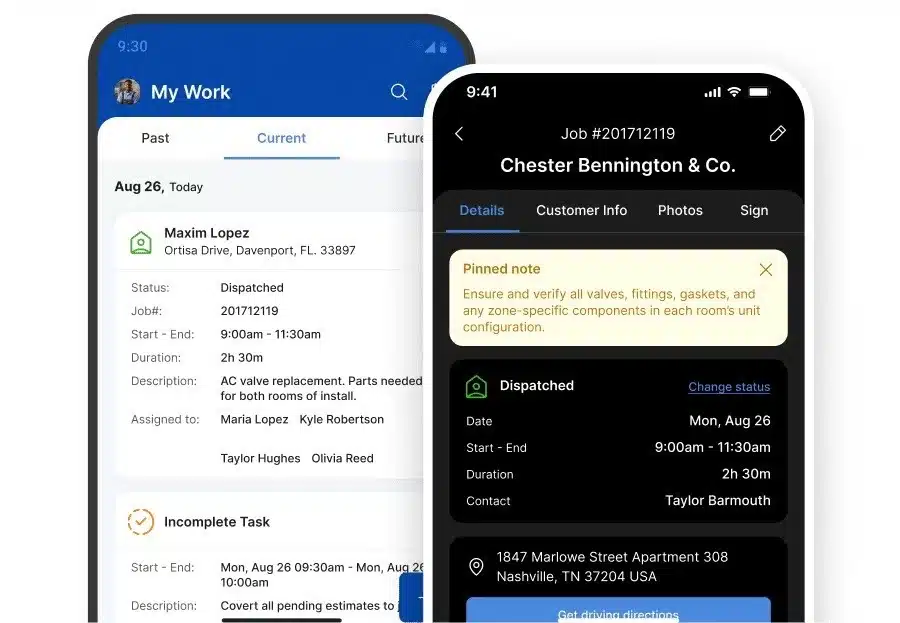
Service Fusion gives technicians access to more than the next address on their schedule.
From the Worker App, they can review customer and equipment history, job notes and documents, get directions, complete tasks, create estimates and invoices, capture signatures, and collect payment. Because that work remains attached to the same job record, office staff can see what happened without having to ask technicians to repeat the update later.
That makes Service Fusion a strong fit for growing teams that want the field and office working from the same information.
What Can Technicians Do Offline?
Offline Mode activates automatically when connectivity drops.
Technicians can still access schedules, customer and job information, equipment records, notes, photos, documents, and existing estimates and invoices. They can also add or edit notes, photos, tasks, and checklists, with changes syncing when service returns.
Some actions still require a connection, including creating new jobs or estimates, changing job status, processing payments, and opening the product catalog.
Service Fusion Pros and Cons
| Pros | Cons |
| Customer and equipment history available in the fieldMobile estimates, invoices, signatures, and paymentsNotes, photos, tasks, and checklists work offlineUnlimited users on every plan. | New jobs, estimates, and status changes require connectivityPayments cannot currently be processed offlineJob Photo Uploads cost extra on Starter.Higher starting price than some small-team tools. |
Service Fusion Pricing
Service Fusion starts at $208 per month billed annually for Starter. Plus costs $325 per month, and Pro costs $533 per month when billed annually.
Every plan includes unlimited users, personalized onboarding, and unlimited support. That means adding another technician, dispatcher, or office employee does not incur an additional per-user subscription charge.
Bottom Line: Choose Service Fusion when you want a broad technician mobile workflow, useful offline access, and one set of job records shared between the field and office.
2. FieldPulse: Best for Configurable Workflows and Offline Work
Starting price: Custom quote
Free option: Free demo
Best for: Teams with different job types, structured technician processes, or frequent work in low-connectivity areas.
FieldPulse is a strong fit when different jobs need different technician workflows.
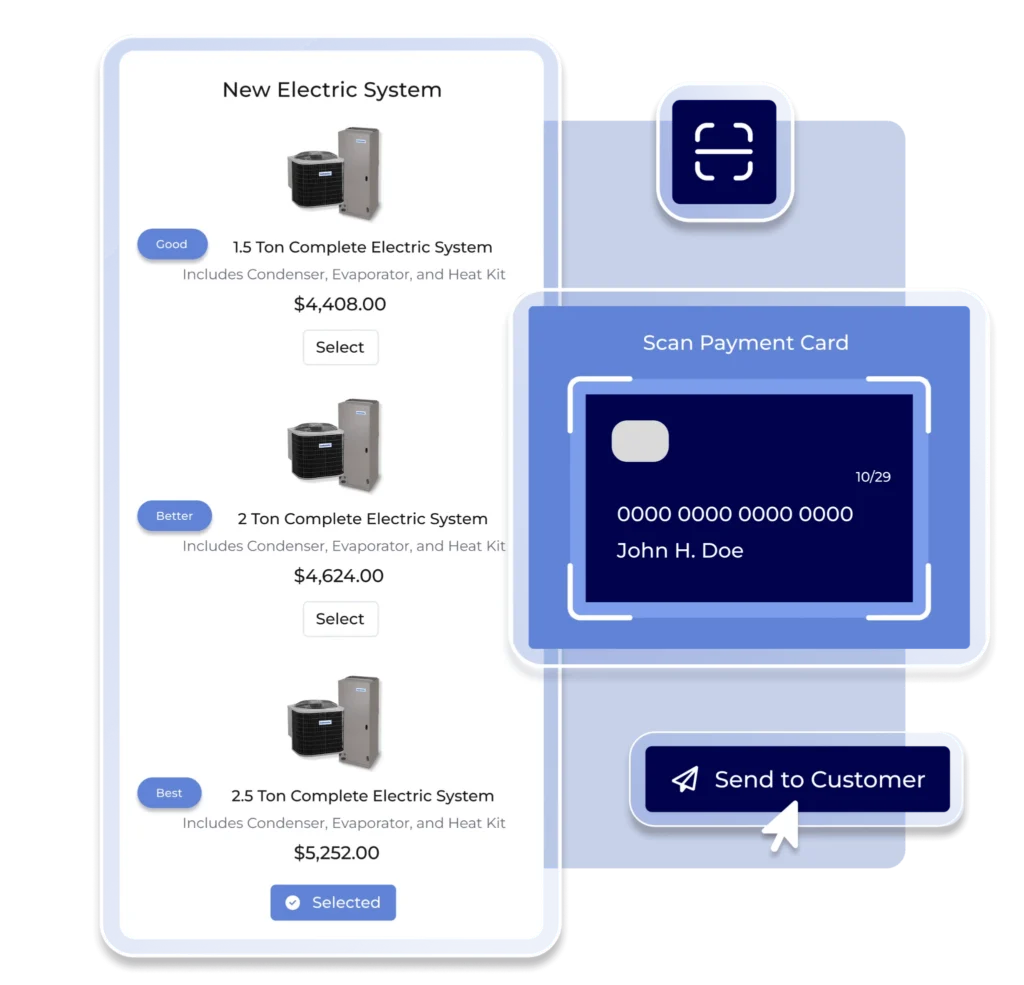
ClearPath lets businesses build job stages around the work being done. A technician handling an installation can be shown required forms, photos, notes, and actions for that stage, while a repair call can follow a shorter process.
FieldPulse also includes dedicated asset and equipment records with service history, warranty details, condition, and maintenance information. Technicians can create estimates, turn them into invoices, and collect payment from the field.
What Can Technicians Do Offline?
FieldPulse has one of the broader offline workflows in this group.
Technicians can access cached job and customer information, add notes and photos, update status, complete forms, track time and materials, draft estimates, edit invoices, and capture signatures.
Changes sync when the device reconnects.
FieldPulse Pros and Cons
| Pros | Cons |
| Broad offline workflowConfigurable job stages through ClearPathDedicated asset and equipment recordsMobile estimates, invoices, and payments. | No published pricingSeat-based pricing can rise with team sizeMore setup than simple workflows may needSome capabilities are premium add-ons. |
FieldPulse Pricing
FieldPulse uses custom, seat-based pricing across Essentials, Professional, and Enterprise packages.
Full-access seats cover the wider platform, while field-only seats are designed for technicians who mainly need assigned work and mobile tools.
Bottom Line: Choose FieldPulse when technicians need different workflows by job type or when broad offline functionality is a priority.
Related: Service Fusion vs. FieldPulse: Full Comparison
3. ServiceTitan: Best for More Complex Technician Workflows
Starting price: Custom per-technician quote
Free option: Free personalized demo
Best for: Contractors that need a deep technician app connected to wider operational workflows.
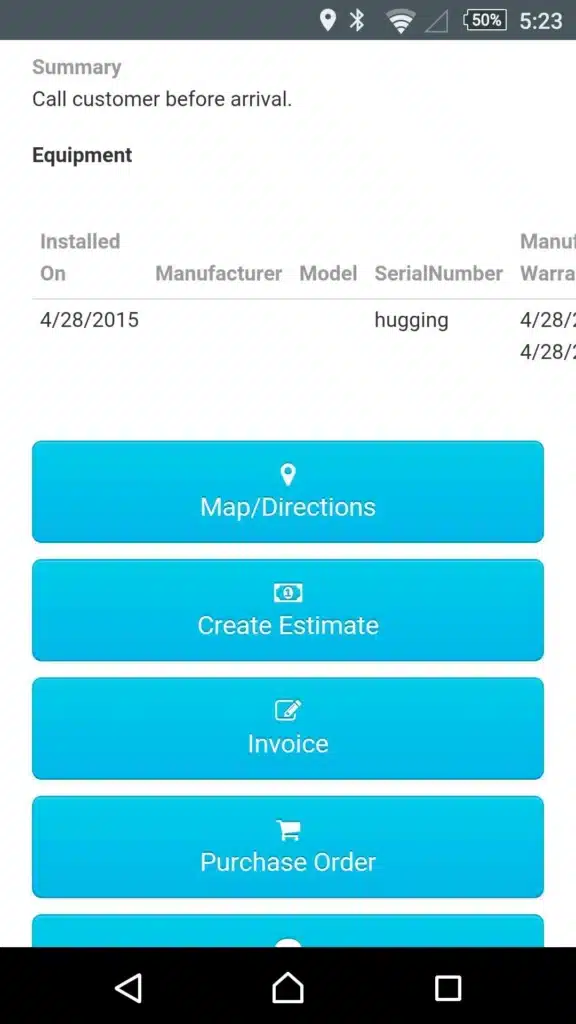
ServiceTitan gives technicians access to job and customer details, forms, photos, equipment history, estimates, invoices, signatures, and payments from the Field Mobile App.
Its equipment records are particularly useful for HVAC and other asset-heavy work. Technicians can review previous repairs and maintenance before starting the job, then build estimates, present options, capture approval, and move the work into invoicing and payment.
What Can Technicians Do Offline?
Most core job actions can be performed offline, including status updates, time tracking, notes, photos, signatures, and estimates. Changes save locally and sync after reconnection.
Some workflows still require internet access, including purchase orders, financing, contracts, inventory availability, and dynamic pricing. Offline payments are not finalized until the device reconnects.
ServiceTitan also offers Atlas AI. The standard experience can answer questions using ServiceTitan data, while equipment manuals, troubleshooting, diagnostic tools, and calculators require Field Pro.
ServiceTitan Pros and Cons
| Pros | Cons |
| Deep technician workflowDetailed equipment historyBroad offline supportMobile estimates, approvals, and paymentsAtlas AI available in the field. | No published pricingPer-technician pricingSome important workflows still need connectivityMore setup and complexity than simpler platformsAdvanced Atlas tools require Field Pro. |
ServiceTitan Pricing
ServiceTitan offers Starter, Essentials, and The Works plans with custom per-technician pricing.
Features vary by package, and additional Pro products can add more capabilities.
Bottom Line: Choose ServiceTitan when technicians need a deep mobile workflow tied into more complex equipment, estimating, payment, and operational processes.
Related: Service Fusion vs. ServiceTitan: Full Comparison
4. Jobber: Best for Straightforward Technician Workflows
Starting price: $29 per month billed annually for one user
Free option: 14-day trial, no credit card required
Best for: Smaller service teams that want a straightforward mobile workflow.
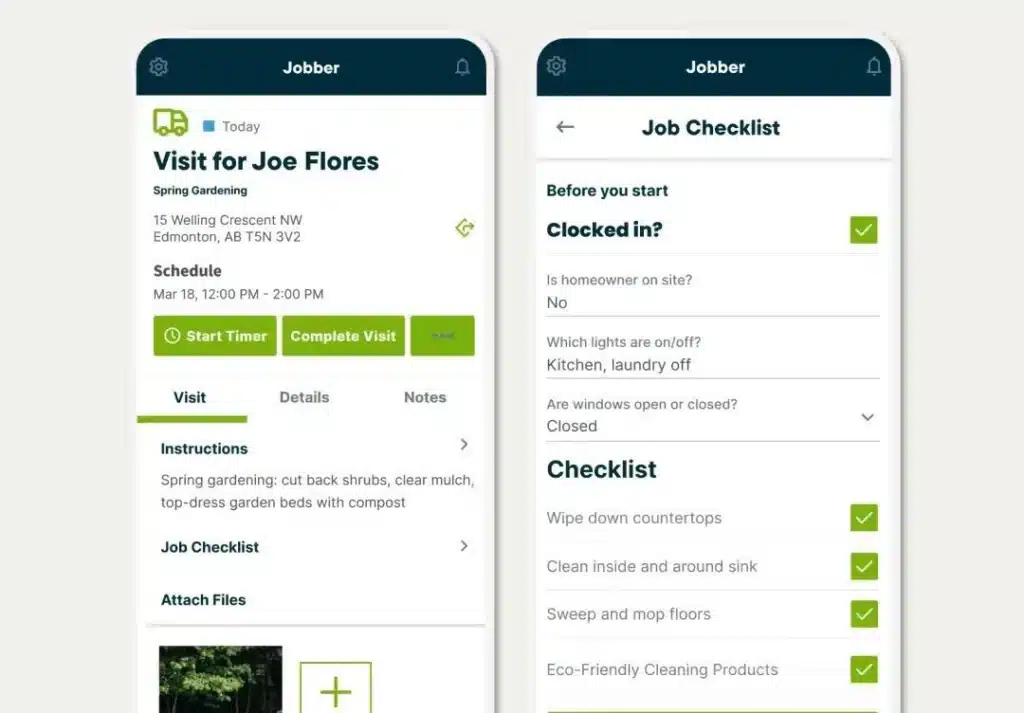
Jobber keeps the mobile experience focused on the customer and the day’s work.
Technicians can review customer details, property addresses, previous work, notes, and billing history from the app. They can also add notes and attachments, capture photos or video, create quotes and invoices, and collect payment in the field.
For teams with relatively consistent service workflows, that keeps the main steps easy to follow without adding a lot of process around them.
What Can Technicians Do Offline?
Jobber supports selected offline tasks.
Technicians can use standard timers, complete job forms, create notes, and add attachments without a connection. Those updates sync when service returns.
The offline workflow is more limited than FieldPulse or ServiceTitan. Payments such as Tap to Pay require connectivity, and Jobber does not document a full offline quote-to-invoice workflow.
Route optimization is also handled on Jobber.com, with the optimized appointment order then appearing in the mobile app.
Jobber Pros and Cons
| Pros | Cons |
| Straightforward customer and job recordsMobile quotes, invoices, and paymentsEasy photo and video captureOffline notes, forms, attachments, and timers. | Offline support covers selected tasks onlyTap to Pay requires connectivity.Route optimization is handled on Jobber.com.Less suited to highly specialized technician workflows. |
Jobber Pricing
For one user, Jobber starts at $29 per month billed annually for Core. Connect costs $99 per month, and Grow costs $149 per month.
Plus starts at $399 per month billed annually for five users. A 14-day free trial is available without a credit card.
Bottom Line: Choose Jobber when technicians need a simple path through customer information, scheduled work, documentation, quoting, invoicing, and payment.
Related: Service Fusion vs. Jobber: Full Comparison.
5. Housecall Pro: Best for Residential Technicians with Reliable Connectivity
Starting price: $59 per month billed annually for one user
Free option: 14-day trial, no credit card required
Best for: Residential service teams that want practical mobile estimating, payments, and closeout tools.
Housecall Pro is built around home-service workflows.
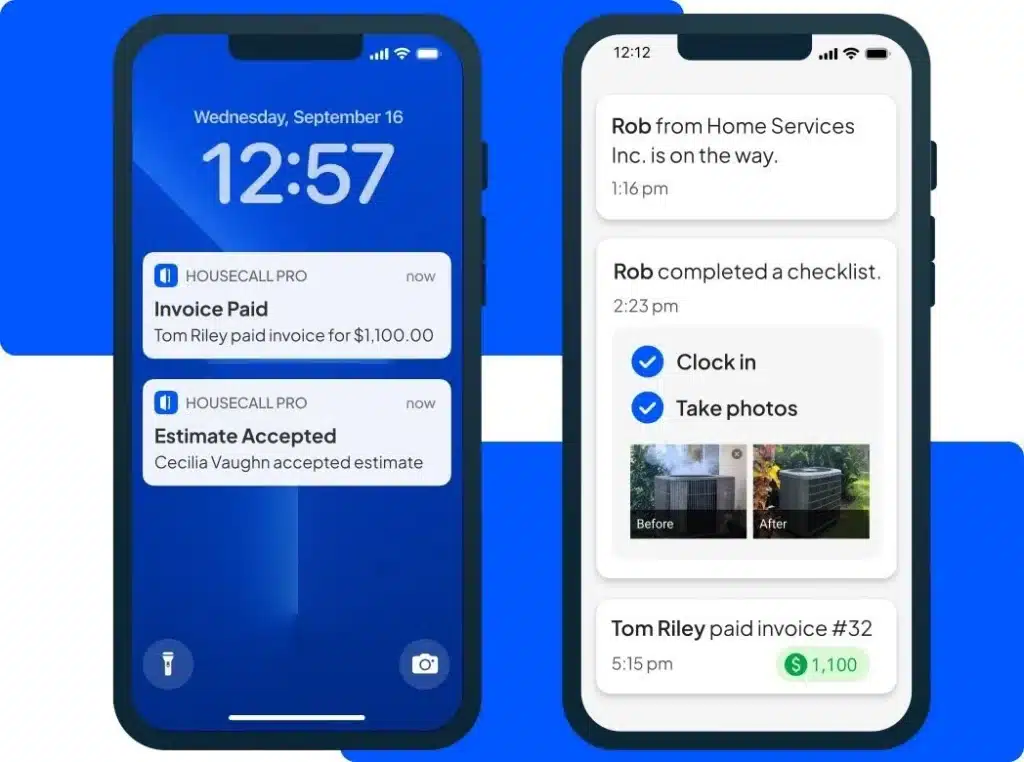
Technicians can view scheduled jobs, open customer details, create estimates, send invoices, collect payment, capture photos, and open directions from the mobile app.
Customer profiles include service history, jobs, estimates, invoices, notes, and attachments. Property Profile can also store equipment details such as make, model, serial number, installation date, and notes.
What Can Technicians Do Offline?
Housecall Pro’s offline support is mainly for viewing previously opened jobs.
Technicians can access stored customer information, history, line items, notes, checklists, and attachments, but offline editing is not currently supported. The job also needs to be opened while connected before its information is cached.
Photo uploads can resume once connectivity is restored.
Housecall Pro Pros and Cons
| Pros | Cons |
| Mobile estimates, invoices, and paymentsCustomer and equipment recordsDirect navigation and On My Way updatesStrong mobile photo capture. | Offline editing is not supportedJobs must be opened first to view them offlineAdvanced routing requires MAX.Some media features require HCP Cam. |
Housecall Pro Pricing
Basic starts at $59 per month billed annually for one user. Essentials costs $149 per month annually for five users, and MAX costs $299 per month annually for eight users.
A 14-day trial is available without a credit card.
Bottom Line: Choose Housecall Pro when you run a residential service business and want technicians to handle common sales and closeout tasks on the go, with reliable connectivity most of the time.
Related: Service Fusion vs. Housecall Pro: Full Comparison
How to Choose a Field Service App for Your Technicians
The best field service app is not the one that looks easiest in a demo.
It is the one that still works when the schedule changes, the customer asks a question you were not expecting, and the signal disappears halfway through the job.
That is what you should test.
Start With the Hardest Job, Not the Easiest One
Most demos show the clean version of field service: the technician gets the job, drives there, completes the work, and closes it out.
Real jobs are messier.
Pick a recent call where the technician needed service history, equipment details, extra photos, an estimate change, or help from the office. Then rebuild that job in each app.
If the software can handle the awkward job, the routine ones should be easier.
Look at How Much the Technician Has to Remember
A good mobile app should carry information for the technician, not make the technician carry it in their head.
When they open a job, they should be able to understand what happened before, what equipment they are looking at, what the customer has already been told, and what needs to happen next.
That matters more than having dozens of fields available somewhere in the system.
If the right information is buried three screens deep, it may as well be back at the office.
Test the Moment Connectivity Disappears
Connectivity varies sharply by location. The FCC reported that, as of June 2025, about 79% of the rural U.S. population had access to outdoor 5G service at 35/3 Mbps, compared with about 99% of the urban population.
So do not ask whether the software “has offline mode.”
Turn on Airplane Mode.
Then try to finish the job.
Can the technician still document the work? Update the status? Build an estimate? Capture a signature? Edit the invoice?
That test will tell you much more than a feature comparison table.
Follow the Job When It Changes
The original work order is often only the starting point.
A technician may find another problem, recommend a replacement, or get approval for additional work while standing with the customer.
Watch what happens next.
If the technician can update the estimate, get approval, invoice the work, and take payment without starting over, the software is supporting the job.
If every change creates another call to the office, another login, or another round of data entry, the workflow is still broken.
Count the Handoffs, Not the Features
A field service app should reduce the number of times the same job gets passed back and forth.
The technician adds the photos. The office should see them.
The technician updates the estimate. The invoice should reflect it.
The technician closes the job. Dispatch should know.
That is a better measure of a connected field workflow than the number of features on the vendor’s website.
Let Technicians Make the Final Call
Managers and owners can judge reporting, pricing, and office workflows.
Technicians are the ones who will find out whether the mobile app makes sense at 4:30 p.m. on the fifth call of the day.
Put the shortlisted apps on the devices your team actually uses and ask technicians to run a real job through each one.
Then pay attention to where they hesitate, where they need help, and where they reach for another tool.
That is usually where the real differences show up.
Related: How to Choose Field Service Management Software
Final Verdict
Service Fusion is our best overall field service app for growing teams because it covers more of the technician’s day in one place.
Technicians can review customer and equipment history, document work, generate estimates and invoices, collect payment, and keep the office updated from the same system. When reception drops, Offline Mode keeps important job information and documentation available.
FieldPulse goes further offline. ServiceTitan goes deeper for complex operations. Jobber and Housecall Pro may suit teams that want simpler connected workflows.
Service Fusion is the better fit when you want a broad technician workflow without paying for another software seat every time the team grows.
See how Service Fusion works from dispatch through payment.
FAQs About Field Service Apps for Technicians
What is the difference between a field service app and field service management software?
A field service app is usually the mobile part that technicians use in the field. Field service management software is a wider system that can also cover scheduling, dispatch, customer records, estimates, invoicing, payments, reporting, and office workflows.
For most service businesses, the better setup is a mobile technician app connected to the same system the office uses. That reduces the need to copy job information between separate tools.
For most service businesses, the better setup is a mobile technician app connected to the same system the office uses. That reduces the need to copy job information between separate tools.
Should technicians help choose field service software?
Yes. Office staff can evaluate scheduling, reporting, accounting, and administrative workflows, but technicians are better placed to judge the mobile experience.
Give technicians access to shortlisted apps and ask them to complete a normal service call. Their feedback can reveal problems with navigation, job history, documentation, and closeout that are easy to miss in a desktop demo.
Give technicians access to shortlisted apps and ask them to complete a normal service call. Their feedback can reveal problems with navigation, job history, documentation, and closeout that are easy to miss in a desktop demo.
What is the best field service app for technicians who are not tech-savvy?
The best option is usually the app that puts the most common tasks within a few obvious steps.
Look for a clear daily schedule, easy access to customer and job information, simple photo and note capture, and a straightforward way to finish the job. Avoid assuming that fewer features automatically mean easier software; test the actual workflow with the technicians who will use it.
Look for a clear daily schedule, easy access to customer and job information, simple photo and note capture, and a straightforward way to finish the job. Avoid assuming that fewer features automatically mean easier software; test the actual workflow with the technicians who will use it.
How much should a field service app cost?
Pricing varies widely.
Some platforms charge per user or technician, while others use flat monthly packages, user allowances, or custom quotes. The lowest starting price does not always mean the lowest cost as the team grows.
Compare what the price becomes at your current headcount and again at the number of technicians you expect to have in the next year or two.
Planning for that second number is worth doing. In AGC’s 2026 industry outlook, 63% of construction firms said they expected to increase headcount during the year, while 82% reported difficulty filling hourly craft positions.
Some platforms charge per user or technician, while others use flat monthly packages, user allowances, or custom quotes. The lowest starting price does not always mean the lowest cost as the team grows.
Compare what the price becomes at your current headcount and again at the number of technicians you expect to have in the next year or two.
Planning for that second number is worth doing. In AGC’s 2026 industry outlook, 63% of construction firms said they expected to increase headcount during the year, while 82% reported difficulty filling hourly craft positions.
What should I ask during a field service software demo?
Ask the vendor to show a real technician workflow rather than a tour of the feature menu.
Have them open a scheduled job, find previous service information, document the work, handle a change in scope, complete the invoice, and show what the office sees afterward. If poor connectivity is common in your trade, ask them to repeat the important steps offline.
Have them open a scheduled job, find previous service information, document the work, handle a change in scope, complete the invoice, and show what the office sees afterward. If poor connectivity is common in your trade, ask them to repeat the important steps offline.
Article Sources
- Associated General Contractors of America and Sage, A Year in the Balance: The 2025 Construction Hiring and Business Outlook, January 8, 2025.
- Federal Communications Commission, 2026 Section 706 Report, 2026.
- Associated General Contractors of America and Sage, Dampened Expectations: The 2026 Construction Hiring and Business Outlook, January 8, 2026.
Related Posts
FieldPulse vs Housecall Pro: Full Comparison
Continue ReadingPlumbing License Requirements by State
Continue ReadingStay Informed
Get the latest news and insights plus, Service Fusion offers and updates.Thank you for your submission.
SHARE